LoRaWAN sensors collect data that is useful for monitoring buildings. Temperature, pressure, level, and more: these measurements are most valuable when they are accessible through an interface that allows users to track changes and detect anomalies.
Connecting a LoRaWAN sensor to an IoT platform allows you to centralize this data so you can view and analyze it. Here are the main steps, using the example of the Enless TX 4/20mA LoRa transmitter integrated with Akenza.
From the sensor to the platform: How does data flow?
The sensor transmits its measurements via radio to a LoRaWAN gateway, which relays the messages to a LoRaWAN network server, also known as an LNS. This server is then connected to the IoT platform.
Each component performs a specific function: the sensor collects the measurement, the network transmits it, and the platform makes it usable. A decoder tailored to the sensor model converts the received messages into understandable data.
In our example, our 4–20 mA transmitter reads the signal from an analog sensor connected to its terminal block. Depending on the sensor used, it can be used, for example, to monitor pipeline pressure, tank level, or industrial temperature. The connection between the sensor and the LoRa sensor remains wired, while data is transmitted to the gateway via radio.
1. Connect the LoRaWAN network to Akenza
Before you begin, make sure you have the following:
- An Akenza account.
- An Enless TX 4/20 mA transmitter and a compatible 4/20 mA sensor.
- LoRaWAN coverage at the installation site.
- The transmitter's credentials: DevEUI, AppEUI, and AppKey.
In the "Integrations" section, connect your LoRaWAN network server to Akenza. The tutorial covers several options, including The Things Network / The Things Industries, Loriot, and Netmore.
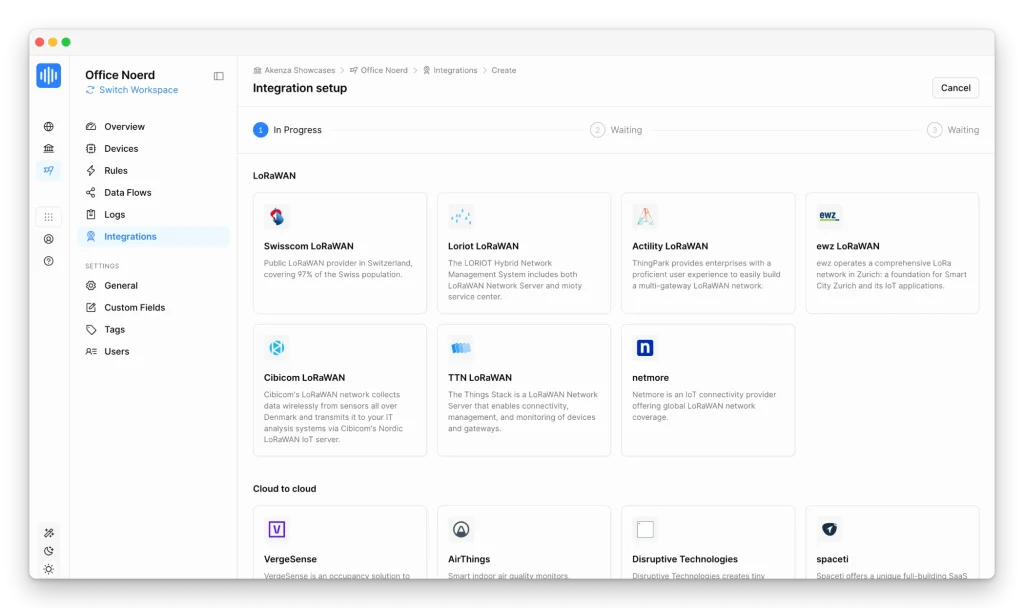
You can also use a Connectivity-as-a-Service offering from Akenza, which you can select when configuring the data flow.
2. Configure the data flow
The Data Flow defines how messages arrive in Akenza, how they are decoded, and where the metrics are stored.
Create a stream, choose your LoRaWAN connectivity, and then select the profile that matches your device. For the TX 4/20 mA 600-035, Akenza offers a decoder that converts received frames into current values expressed in milliamperes. This allows you to use this profile without having to develop the decoding logic yourself.
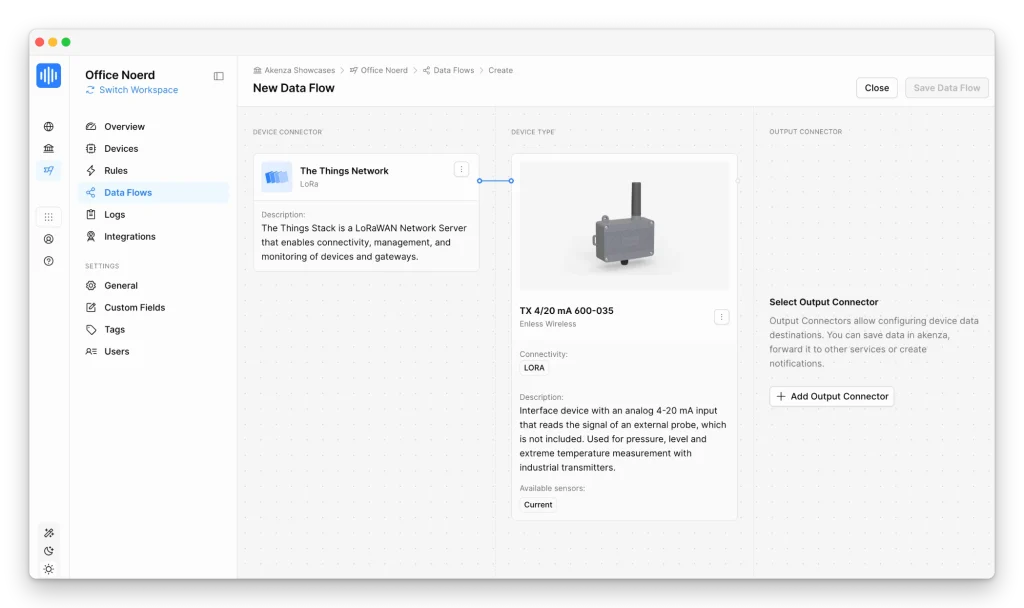
Next, choose where to send the metrics. The Akenza DB connector, used in this tutorial, allows you to save them to the platform's database. Save the flow with a name that's easy to identify.
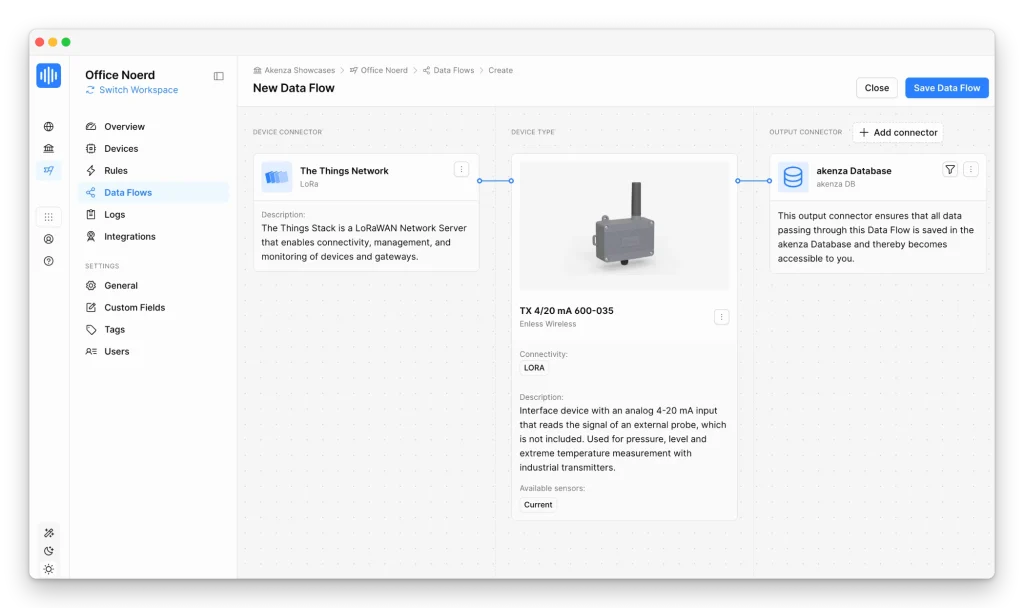
3. Register and activate the sensor
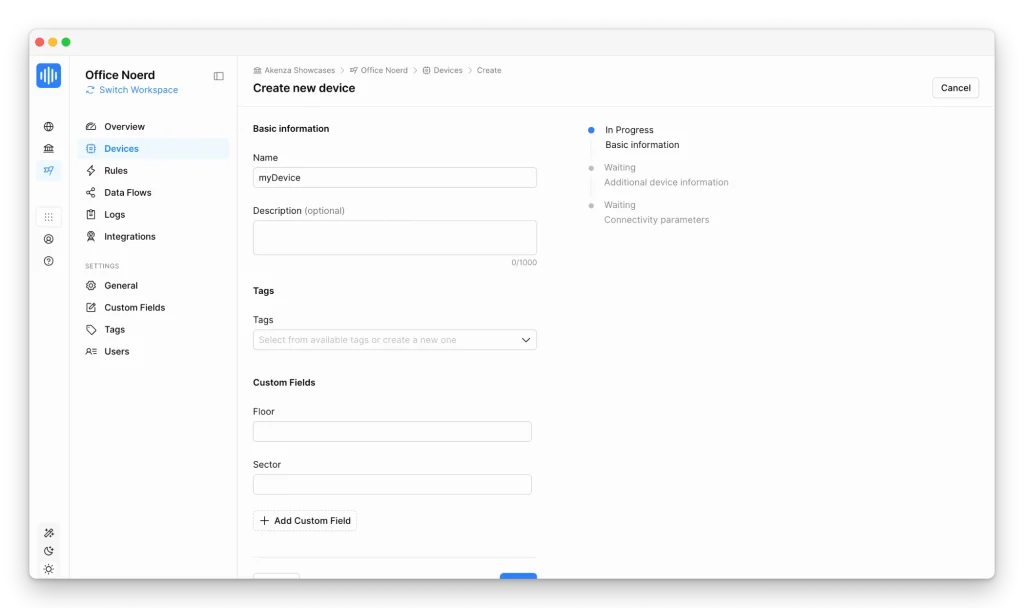
In Device Inventory, click Create Device, name your sensor, and associate it with the flow you created. A name such as “Boiler Room – System Pressure” will make it easier to identify when multiple devices are deployed.
Next, enter its DevEUI, AppEUI, and AppKey settings, which are required to activate it on the LoRaWAN network.
Set up the transmitter according to the Enless guide: select LoRaWAN mode, connect the sensor, verify its power supply, and then turn on the power. The 4/20 mA TX will then initiate its activation on the network via OTAA.
At the end of this phase, the indicator light will show the result: green for successful activation, orange for activation with a weak signal, and red if activation fails. Check the signal reception at the intended location before completing the installation.
4. View and Analyze the Measurements
After receiving the first message, go to Data Overview in Akenza to check the sensor data.
With the TX 4/20 mA, the decoded value corresponds to the measured current. To display pressure, level, or temperature, apply the conversion defined by the connected sensor. For example, for a linear pressure sensor configured for 0 to 10 bar, a 12 mA signal corresponds to 5 bar.
This distinction is essential: the decoder interprets the radio signal, while the scaling circuit converts the current into a value that is useful to the operator.
Once the measurements have been validated, they can be used to populate your dashboards and monitoring rules—for example, to track changes in a level or detect when a pressure threshold has been exceeded.
An approach that can be tailored to your IoT projects
Integration relies on three elements: operational LoRaWAN connectivity, a suitable decoder, and verified data. The example of the TX 4/20 mA demonstrates how to make measurements from an analog sensor accessible on an IoT platform.
To apply this process to another Enless sensor, check whether the corresponding profile is available in Akenza and follow the activation procedure specific to that model.
Would you like to connect your devices to an IoT platform? Discover Enless Wireless’s LoRaWAN sensors and check out the comprehensive tutorial on integrating them with Akenza.